Apple Lightning Digital AV Adapter,1080P Lightning to HDMI Cable Sync
ScreenUSD $13.99
Condition : New
Free Shipping
{{variant_type_name}} :

Notify me when the price drops
We will email you if we find a lower price on this product!
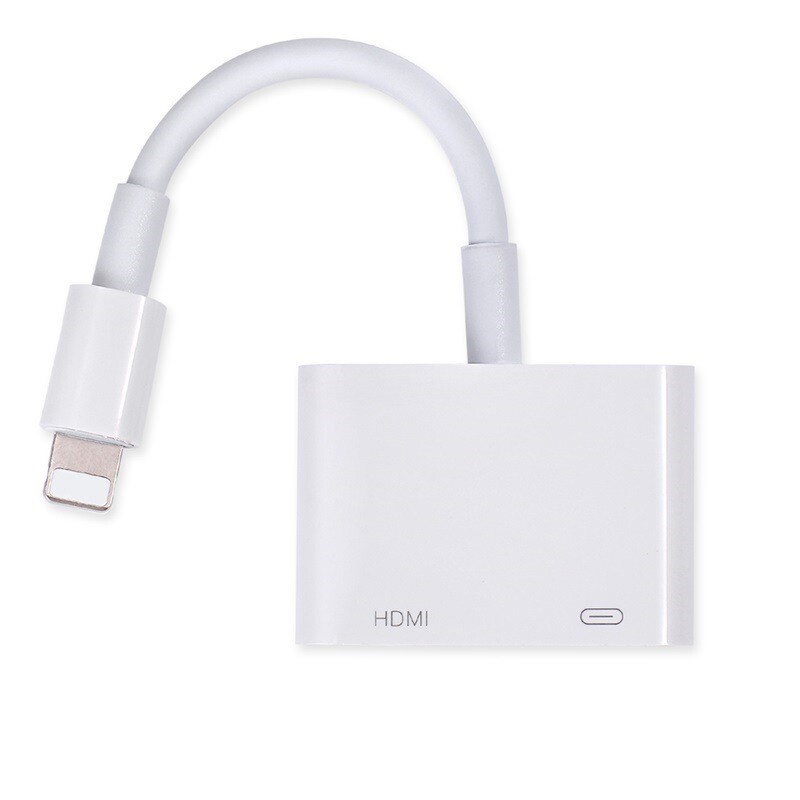
Apple Lightning Digital AV Adapter,1080P Lightning to HDMI Cable Sync Screen HDM
The Lightning Digital AV Adapter lets you output your device’s video or photo content to your big screen, in resolutions up to Full High Def (1080p).
Also lets you ‘mirror’ what’s displayed on your device screen to your HDMI-equipped TV, projector or other compatible display - including apps, presentations, websites, slideshows and more.
How? It’s easy -- just attach the Lightning Digital AV Adapter to the Lightning connector on your device. Then, connect the other end of the Adapter to your TV or projector, using an HDMI cable (HDMI Cable sold separately).
Compatible with: iPhone 5, iPhone 5c, iPhone 5s, iPhone SE, iPhone 6, iPhone 6 Plus, iPhone 6S, iPhone 6S Plus, iPhone 7, iPhone 7 Plus; iPad with Retina Display, iPad mini, iPad mini 2, iPad mini 3, iPad mini 4, iPad Air, iPad Air 2, iPad Pro (9.7-Inch) 【Product description】 Use the Lighting Digital Adapter with your iPhone, iPad, or iPod with lighting connector. It supports mirroring of what is displayed on your device screen including apps, presentations, websites, slideshows and more to your HDMI-equipped TV, display, projector or other compatible display in up to 1080p HD. ◆Compatibility with numerous Apple devices: iPhone/iPad/iPod, audio/Video transfer to display/projector/TV with HDMI port. ◆ Most Apps Support: YouTube, Office, Safari, Chrome, Facetime and more on your Apple Devices. ◆ Resolution: 1080P. 【Questions&Answer】 Q: Why does my lightning digital av adapter not work? A:Make sure that your lightning port is good and clean enough,some lightning ports of iPhone or iPad is broken. Other warm tips: 1.Make sure that you should have a HDMI cable to support it to work with good connection. 2.It Not supports CBS,Netflix, hulu, Directv, amazon video and other paid Apps. 3.Please select the correct HDMI port on the TV or port.(Choose HDMI 1 or HDMI 2 to try) 4.The TV mode should not be PC mode. 5.Need good HDMI cable. Q: Why does the lighting digital adapter get hot while in use? A: It is normal.Please take a rest after a long time use. 【User Guide】 Step 1: Insert the lightning cable into the 5V/2A USB AC Adapter (Recommend original lightning cable) Step 2: HDMI Port: connect to your TV or big screen via HDMI cable. Step 3: lightning connection: connect into your iPhone, iPad, iPod. Step 4: Please click the "Trust" and wait 5 seconds to synchronize the phone screen with the TV.
The Lightning Digital AV Adapter lets you output your device’s video or photo content to your big screen, in resolutions up to Full High Def (1080p).
Also lets you ‘mirror’ what’s displayed on your device screen to your HDMI-equipped TV, projector or other compatible display - including apps, presentations, websites, slideshows and more.
How? It’s easy -- just attach the Lightning Digital AV Adapter to the Lightning connector on your device. Then, connect the other end of the Adapter to your TV or projector, using an HDMI cable (HDMI Cable sold separately).
Compatible with: iPhone 5, iPhone 5c, iPhone 5s, iPhone SE, iPhone 6, iPhone 6 Plus, iPhone 6S, iPhone 6S Plus, iPhone 7, iPhone 7 Plus; iPad with Retina Display, iPad mini, iPad mini 2, iPad mini 3, iPad mini 4, iPad Air, iPad Air 2, iPad Pro (9.7-Inch) 【Product description】 Use the Lighting Digital Adapter with your iPhone, iPad, or iPod with lighting connector. It supports mirroring of what is displayed on your device screen including apps, presentations, websites, slideshows and more to your HDMI-equipped TV, display, projector or other compatible display in up to 1080p HD. ◆Compatibility with numerous Apple devices: iPhone/iPad/iPod, audio/Video transfer to display/projector/TV with HDMI port. ◆ Most Apps Support: YouTube, Office, Safari, Chrome, Facetime and more on your Apple Devices. ◆ Resolution: 1080P. 【Questions&Answer】 Q: Why does my lightning digital av adapter not work? A:Make sure that your lightning port is good and clean enough,some lightning ports of iPhone or iPad is broken. Other warm tips: 1.Make sure that you should have a HDMI cable to support it to work with good connection. 2.It Not supports CBS,Netflix, hulu, Directv, amazon video and other paid Apps. 3.Please select the correct HDMI port on the TV or port.(Choose HDMI 1 or HDMI 2 to try) 4.The TV mode should not be PC mode. 5.Need good HDMI cable. Q: Why does the lighting digital adapter get hot while in use? A: It is normal.Please take a rest after a long time use. 【User Guide】 Step 1: Insert the lightning cable into the 5V/2A USB AC Adapter (Recommend original lightning cable) Step 2: HDMI Port: connect to your TV or big screen via HDMI cable. Step 3: lightning connection: connect into your iPhone, iPad, iPod. Step 4: Please click the "Trust" and wait 5 seconds to synchronize the phone screen with the TV.
Returns Accepted for this item if it's within 60 Days
Price type
IN STOCK
OUT STOCK




 .
.
